GridWorld
Objective #1: Explain the rationale for the Case Study.
- The GridWorld Case Study will be tested on the 2014 exam. The plan is that AFTER the 2014 exam the AP curriculum will no longer contain a case study component. Beginning with the 2014/2015 school year, the curriculum will include a requirement that students spend at least 20 hours engaged in a hands-on, in-class laboratory experience that satisfies certain characteristics. To support this requirement there will be an updated Course Description document and three provided APCS Labs that may be used to satisfy the lab requirement. These materials are to be officially released early in 2014. An unofficial draft version of the APCS Labs is available at http://www.tymann.us/apcs_labs/ . Please note that these materials are not official, not supported, and are subject to change.
- College Board includes questions on the AP Computer Science exam from a case study. Currently, the case study is known as the GridWorld Case Study. In order to do well on the AP exam, you must be familiar with the content of this Case Study. You must read the Case Study Student Manual narrative at http://media.collegeboard.com/digitalServices/pdf/ap/explore-ap/AP_Computer-Science-A-Grid-World-Student-Manual.pdf
- On the part 1 multiple choice section of the exam at least 5 out of the 40 questions will have to do with the Case Study.
- On the part 2 free response section of the exam one out of the four exercises will require students to modify the
source code or add additional code to existing methods. This question
will probably ask you to derive another class from Critter and override some
of its methods or add new methods. When answering this free-response question,
- try to find a similar code segment in the Case Study source code and adapt
that code rather than writing something from scratch
- use equals method rather than == if necessary
- correctly use ArrayList's vs arrays
when necessary
- don't forget to cast when using the ArrayList get method
- don't call methods from objects of the wrong type
- don't use private properties when you're writing code in a different
class
- The case study is an important part of this Java course for a number of reasons. It requires you to work with a real-world program that is significantly longer than those typically assigned by a programming teacher. It also makes you think about issues of good programming design. It is also beneficial to study code written by expert programmers. A number of principles of object-oriented programming (OOP) are intentionally worked into the Case Study.
Objective #2: Execute projects in Eclipse that make use of the GridWorld code from College Board.
- To execute a project that makes use of Bug, Critter and other GridWorld-related classes, you must link your Eclipse project to the gridworld.jar file that is available as a download from collegeboard.org. You can obtain this file in one of three ways:
- To link to the gridworld.jar file so your project can use Bug or other GridWorld-related objects. Here is a video demonstrating how to follow these steps in setting up a GridWorld project.
- Right-click the name of the Java project that you have created in the Package Explorer along the left edge of the window
- Select the "Properties" command at the bottom of the shortcut menu
- Select "Java Build Path" on the left-side of the window and select the "Libraries" tab on the right side.
- Click the "Add External JARs" button and browse to thegridworld.jar file.
- Click OK to close the window.
- To make use of Bug or other classes, you must import those classes at the top of your class. For example, in the BugVariations demo program, the following import statements are necessary
import info.gridworld.actor.ActorWorld;
import info.gridworld.actor.Actor;
import info.gridworld.actor.Bug;
import info.gridworld.grid.Location;
import info.gridworld.grid.UnboundedGrid;
import java.awt.Color;

If you want to instantiate a Critter object in a program, you would need to add the import statement

import info.gridworld.actor.Critter;

to the top of the file. You could import everything from the gridworld package by  typing

import info.gridworld.*;
Objective #3: Be familiar with the core classes & utility classes of the Case Study and their implementations. That is, you must be able to trace all the code in these classes.
- The core classes of the Case Study are the Bug, BoxBug, Critter, ChameleonCritter, AbstractGrid, & BoundedGrid classes. The Grid interface is also important. The GridWorld
API at http://horstmann.com/gridworld/javadoc is very useful for reviewing the various classes and methods.
- The grid contains one or more actors. During a single step, every actor gets a chance to act. When an actor acts it does not necessarly make a move. Other acts including changing color, changing direction, removing another actor from the grid (i.e. eating another actor), or adding a new actor to the grid.
- Bug - A Bug moves forward to an empty location or onto a flower when possible. When it moves, it leaves behind a flower in its former location. When it moves onto
a flower, the flower is removed from the grid. When a bug hits the edge of the grid or another Actor, it turns 45 degrees to the right. A bug inherits many method from the Actor class but it overrides the act method and includes a few additional methods
- void act() - overridden from Actor, a bug moves if it can. If it can't move then it turns.
- void turn() - turns a bug 45 degrees to the right but its directions stays the same.
- void move() - moves bug forward and drops flower in old location
- boolean canMove() - returns true if a Bug can legally move. A move is legal if the location in front of a bug is a valid location on the grid and if it is empty or only contains a flower.
- BoxBug - BoxBug is a child of Bug. A BoxBug moves like a bug but it traces out a square with a certain side length. The act method is overridden that if a BoxBug is blocked, it makes two right turns
and starts again. A BoxBug has property called sideLength. If a BoxBug has a sideLength of k, then you will see k+1 flowers on each side of its traced out diagram.
- Critter - A Critter eats actors that are adjacent to it except for rocks or other critter's. After eating, it moves to a
random adjacent location. If there are no empty, adjacent locations, a critter does not move. A critter has overridden and new methods
- void act() - gets list of neighbors, processes them, gets list of possible locations to move to, picks one of those locations, them moves to that new location
- ArrayList<Actor> getActors() - returns a list of adjacent neighbor actors
- void processActors(ArrayList<Actor> actors) - processes the actors in the parameter. It eats anything that is not a rock or another critter. Anything else is removed from the grid (i.e. "eaten").
- ArrayList<Location> getMoveLocations() - returns a list of valid, adjacent, empty locations which are possible locations for a next move.
- Location selectMoveLocations(ArrayList<Location> locs) - selects a location for a next move
- void makeMove(Location loc) - moves the Critter to the specified location
When working with or extending the Critter class, you are not allowed to override the act method. Also, you should only change a critter's state (i.e. modify its properties) in its processActors or makeMove methods. Furthermore, you should only change the state of other actors in the critter's processActors method. (These rules don't apply to bugs however.)
- CrabCritter - A crab critter eats actors that are in front of it. It moves randomly either left or right.
- ChameleonCritter - A chameleon critter gets a list of adjacent neighbors and then it randomly picks one. Then it changes its color to the color of the randomly selected adjacent neighbor. It moves like a Critter but first changes its direction
to face the new location before moving.
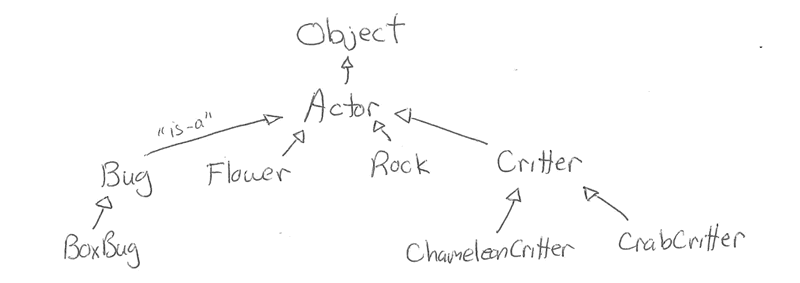
- The classes are related through inheritance since some are child classes of others. Here's a class diagram.
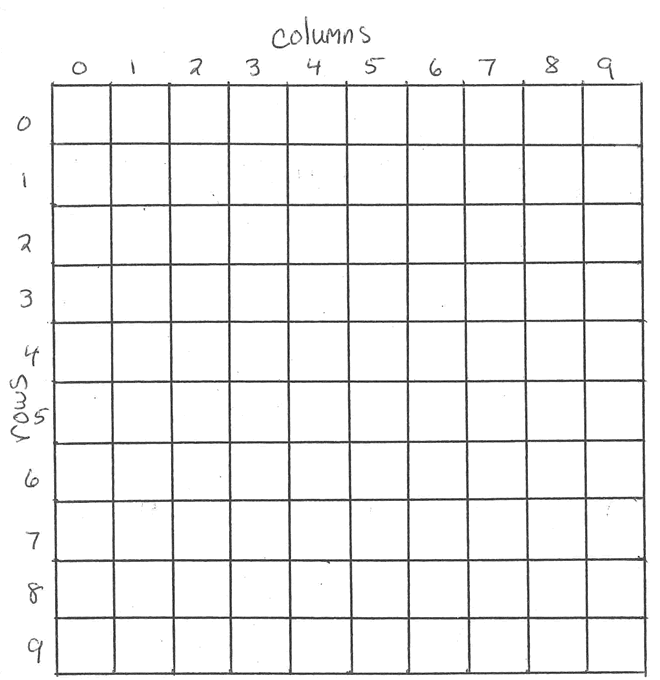
- Grid interface - Grid is an interface for a two-dimensional, grid-like environment containing arbitrary objects. In GridWorld it usually contains actors. The Grid interface specifies the following methods which are implemented in the black box class BoundedGrid. Each location in the grid is in a row-col coordinate position. For example, the location in the top-left corner is considered to be in Row 0 and Column 0 (remember RC Cola with Row always listed before Column) and is referred to as location 0, 0. The location to the right of the location 0, 0 is in position 0, 1 since it is Row #0 and Column #1.
- int getNumRows() - returns the number of rows in the grid
- int getNumCols() - returns the number of columns in the grid
- boolean isValid(Location loc) - returns true if loc is in the grid
- E put(Location loc, E obj) - puts the object obj in loc
- E remove(Location loc) - removes and returns the object (i.e. actor) that is in loc
- E get(Location loc) - returns the object (i.e. actor) that is in loc
- ArrayList<Location> getOccupiedLocations() - returns an ArrayList of occupied locations in this grid
- ArrayList<Location> getValidAdjacentLocations(Location loc) - returns an ArrayList of neighboring locations to loc that are in the grid
- ArrayList<Location> getEmptyAdjacentLocations(Location loc) - returns an ArrayList of neighboring locations to loc that do not contain objects (i.e. actors)
- ArrayList<Location> getOccupiedAdjacentLocations(Location loc) - returns an ArrayList of neighboring locations to loc that actually contain objects (i.e. actors)
- ArrayList<E> getNeighbors(Location loc) - returns an ArrayList of objects (i.e. actors) that are in neighboring locations to loc.
Here is a visual representation of a BoundedGrid
Objective #4: Be familiar with the black box & utility classes of the Case Study and their available methods and constants. That is you must know their API's.
- The classes Location, Actor, Rock, & Flower are black box classes. You do not have to know how the methods in these classes are implemented but
you must be familiar with their available methods and constants (i.e. their API).
- Actor - An Actor is something that can act. It has color and direction. Actor is the parent class of Flower, Rock, Bug, & Critter. It has location, direction & color.
Actors act in "row-major" order.
That is, all of the actors in the grid's top row 0 get a chance to act from left to right and then the actors in row 1 from left to right and so on. An actor has the methods
- Color getColor() -
- void setColor(Color newColor) -
- int getDirection() -
- void setDirection(int newDirection) -
- Grid<Actor> getGrid() - this is a very important method that is used a lot. It returns null if the actor isn't currently in a grid.
- Location getLocation() - returns the actor's location
- void putSelfInGrid(Grid<Actor) gr, Location loc) -
- void moveTo(Location newLocation) - if the new location is occupied then the actor that is already in the location is removed from the grid!
- void act() - reverses the direction of the actor though this method is overridden in its child classes.
- String toString() -
- Location - The Location class keeps track of row and column values for positions in the grid.
The top left corner location within a grid is the location (0, 0). This is similar to the notation of two-dimensional arrays. It has the methods
- int getRow() -
- int getCol() -
- Location getAdjacentLocation(int direction) - returns the adjacent location in the direction closest to the direction property.
- int getDirectionToward(Location target) - returns the direction, rounded to the nearest direction, from the current location toward the parameter location.
- boolean equals(Object other) -
- int compareTo(Object other) - when two location objects are compared (0, 1) is less than (0, 2) and (1,
3) is less than (3, 0).
- String toString() -
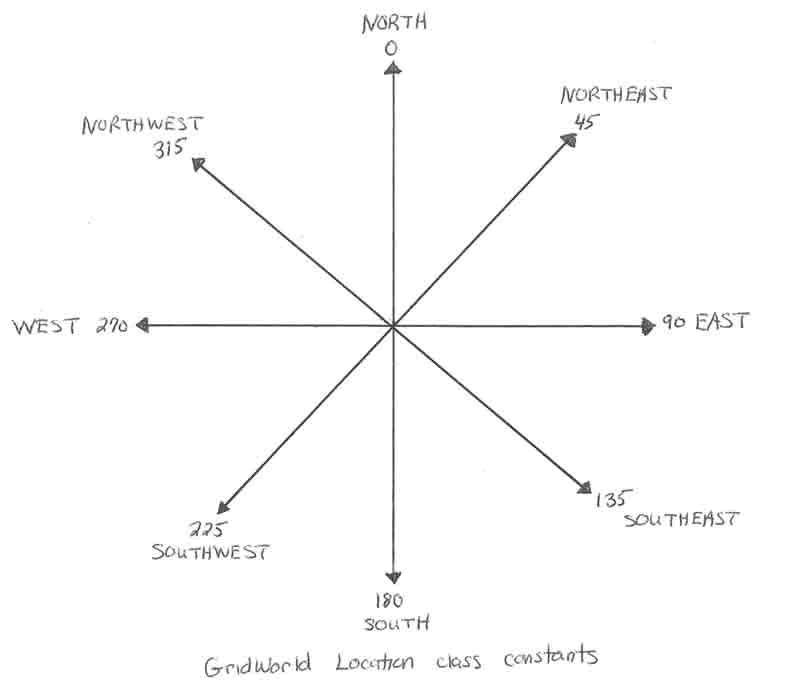
The Location class contains the constants
Location.NORTH = 0
Location.EAST = 90
Location.SOUTH = 180
Location.WEST = 270
Location.NORTHEAST = 45
Location.SOUTHEAST = 135
Location.SOUTHWEST = 225
Location.NORTHWEST = 315
Location.LEFT = -90
Location.RIGHT = 90
Location.HALF_LEFT = -45
Location.HALF_RIGHT = 45
Location.FULL_CIRCLE = 360
Location.HALF_CIRCLE = 180
Location.AHEAD = 0
Notice how NORTH is 0 and, as you move clockwise to NORTHEAST and then EAST, you are adding degrees until you reach 360 at which point you are back to NORTH again.
- Rock - A rock does nothing. The default color of a Rock is black.
- Flower - A flower darkens its color when it acts. The default color of a flower is pink although a constructor allows you to create a flower of another color.
- ActorWorld - This is not tested on the AP exam.
- BugRunner, BoxBugRunner, ChameleonRunner, CrabRunner, CritterRunner - These classes are not tested on the AP exam but serve as
client programs for the Case Study.
- CrabCritter - This is not tested on the AP exam but it's useful to study how it extends Critter.
- AbstractGrid - Students should be familiar with this class but they won't be tested on it. AbstractGrid contains methods that are common to all grid
implementations (BoundedGrid & other hypothetical ones.)
- BoundedGrid - Students should be familiar with this class but they won't be tested on it. BoundedGrid is implemented as a two-dimensional array of
Object's named occupantArray. The generic type E can't be used since Java doesn't allow generic arrays.
The material below is not tested on the AP exam.
Objective #5: Explore further possibilities with GridWorld.